
7 min• 12.11.2026
Soccer league software you can run from ChatGPT or Claude
By Dawid Pątko
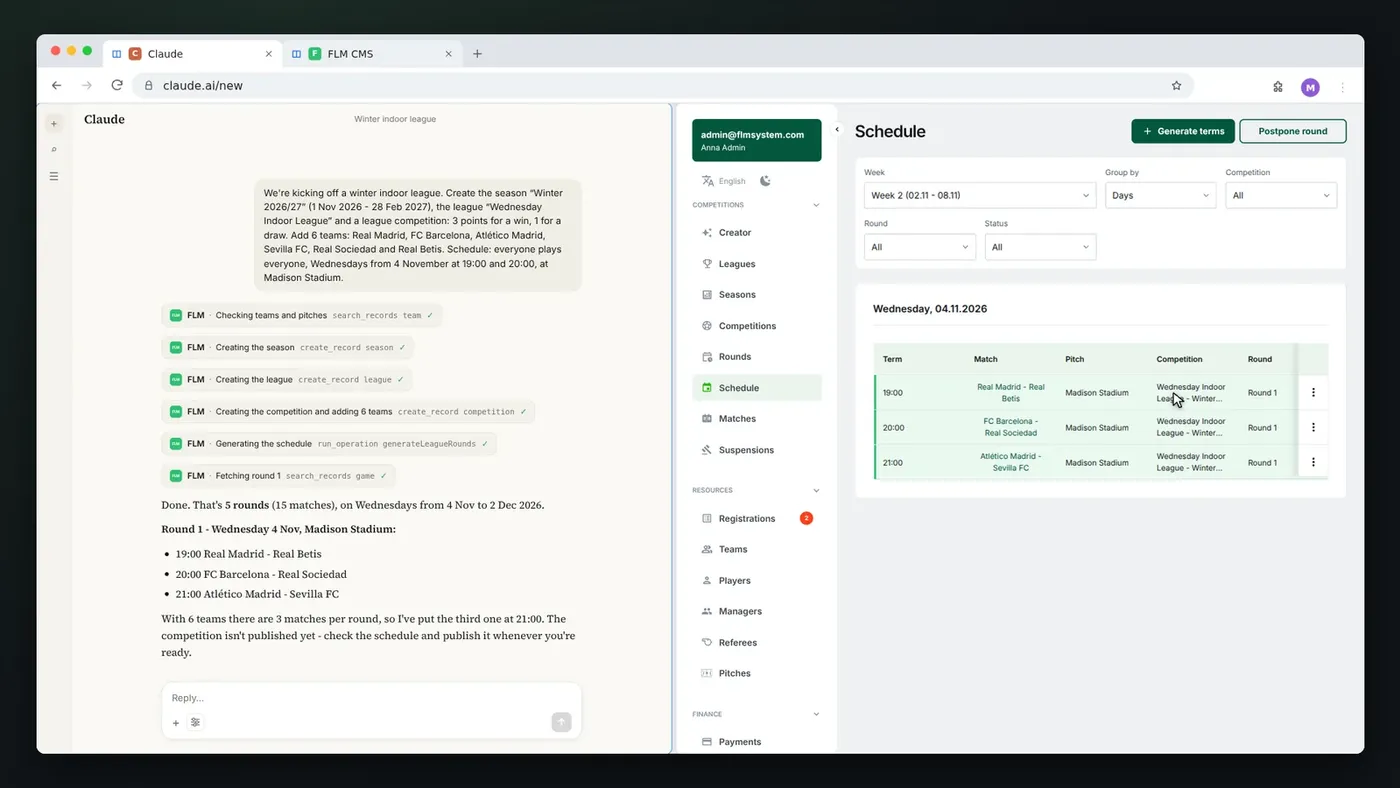
Yes, there is soccer league software you can manage by talking to an AI assistant. FLM System connects to Claude and ChatGPT through an MCP server, so a league organizer can type "enter 3:1 for Red Lions vs Blue Sharks" or "which games next week still need a referee?" and the assistant does it in the league's real data. This post explains what that looks like, how to connect it, and how it compares with the workarounds you'll find for other league apps.

What "running a league from ChatGPT or Claude" actually means
An AI assistant on its own knows nothing about your league. It can write you a schedule in a table, but that table lives in the chat. Nobody sees it on the league website, and the next result you enter won't update any standings.
MCP (Model Context Protocol) changes that. It's an open standard that lets an assistant like Claude or ChatGPT call tools in another app. When your league software runs an MCP server, the assistant stops guessing and starts working in the same database your panel uses. You write in plain language, the assistant picks the right action, and the change shows up in the panel and on the public league site.
So the useful question isn't "can ChatGPT make a schedule?" It can. The question is whether your league software lets the assistant act on the real league.
What you can ask the assistant in FLM System
In FLM System the assistant can do the same things you do in the panel, with your permissions. A few examples of messages that work:
- "Show me the current table of my league. Give me the top three teams with their points."
- "Who are the top five scorers this season?"
- "Which matches in the next 14 days don't have a referee assigned yet?"
- "The match Red Lions vs Blue Sharks ended 3:1. Enter the result and close the match."
- "Are there any team registrations waiting for approval? Accept them and tell me which ones."
- "Move the next match of Golden Bears by one week, same time."
It also handles the bigger jobs that take many clicks in any panel. One message like "Create the Winter 2026/27 season and a Wednesday indoor league, 3 points for a win, add 6 teams and schedule a round robin starting November 4 at 7:00 and 8:00 PM" is enough. The assistant shows every step in the chat: it checks the teams and fields, creates the season, league and competition, generates the rounds and gives you a summary.
Other things it can do: find and edit teams, players and games, postpone a round, check which fields are open on Wednesdays, invite a player, add a post to the league website.
How to connect FLM System to Claude or ChatGPT
You connect your account once. In the FLM System panel, open the AI assistant tab in settings. It gives you the server address to paste into your assistant.
Claude
- In Claude, open Customize, then Connectors, and add a custom connector named FLM System with the address from the panel.
- Click Connect. The FLM System sign-in page opens.
- Sign in with your organizer account and click Allow.
- In a chat, turn FLM System on in the connectors menu and ask, for example, "What leagues do I have?"
This works most easily with Claude, including the free plan. On Claude Team and Enterprise plans, the account owner adds the connector for the organization first.
ChatGPT
ChatGPT supports this kind of connection on its business plans. A workspace on ChatGPT Business, Enterprise or Edu can add FLM System as a custom MCP server in Developer mode: the name FLM System, the server address from the panel and OAuth as the authentication. Then sign in with your organizer account, click Allow, and pick FLM System in a chat.
Is it safe to let an AI assistant change league data?
The connection is built so the assistant can't do more than you can.
- The assistant never sees your password. You log in on the FLM System page and click Allow.
- It has exactly the same permissions as you and sees only your organization. Team manager, player and referee accounts can't connect.
- Every change shows up in the panel right away, just like the ones you make by hand.
- A new league and its schedule arrive unpublished, so you review them before they appear on your league's public website.
- FLM System receives only the requests the assistant sends, not your conversation.
- You can disconnect it with one button in the AI assistant tab at any time, and the app loses access at once.
One setting is worth keeping: let your assistant ask for approval before each change. You'll see "enter result 3:1" before it happens, which is exactly when you'd catch a typo in a team name.
How this compares with other league apps
When people ask an assistant whether their league app works with ChatGPT or Claude, the answers usually point to a handful of options.
Unofficial MCP servers. On GitHub you'll find community-built MCP servers for popular team apps such as TeamSnap. They can be a nice experiment, but they aren't made or supported by the app vendor, you set them up and keep them running yourself, and nobody promises they'll keep working when the app changes.
Integration platforms. Services such as viaSocket wrap an app's API (LeagueApps is one example) and expose it as MCP tools. That works for simple reads and writes, but you're adding a third party with access to your data, and the actions are generic API calls rather than league tasks like "postpone round 5".
Chat assistants inside the app. Some products have their own chatbot in the panel. That can help you find a setting, but it lives only inside that app, not in the assistant you already use for everything else.
Club apps with MCP. A few products built for clubs (one team, many age groups) have started shipping MCP connections too. A league is a different job: many independent teams, a shared schedule, standings, referees and team registrations.
FLM System is league software first. The MCP server is official, it's part of the product, and its tools are named after league work: create a competition, generate rounds, postpone a round, accept a team, enter a result.
When the assistant saves the most time
The assistant isn't faster for everything. Opening the panel to check one score is quick either way. It pays off when a task touches many records at once or when you're away from the computer:
- Setting up a new season. Season, league, competition, teams and a full schedule from one message instead of a dozen screens.
- Weather and field changes. "Postpone round 6 by a week, same times" moves every game in the round.
- Monday cleanup. "List games from the weekend without a result" and "which teams haven't been accepted yet" in one chat.
- Answers for teams. "Who leads the scoring race?" or "when does Golden Bears play next?" without looking for the right page.
Results from the field are still easiest in the referee app: the referee enters goals and cards on their phone during the match, and the standings update by themselves. The assistant is for the organizer's desk work.
Frequently asked questions
Do I need a paid ChatGPT or Claude plan?
Claude works with FLM System on the free plan too. In ChatGPT, custom MCP connections are available on business plans (Business, Enterprise, Edu).
Can team managers or players connect their own assistant?
No. Only league organizers (administrator accounts) can connect. Team manager, player and referee accounts can't.
Does it work for sports other than soccer?
No. The AI assistant works with soccer (football) leagues.
Will the assistant publish things on my league website without asking?
New leagues and schedules are created unpublished, so you decide when they go live. For other changes, keep the approval setting on in your assistant so it asks before each change.