
Player accounts
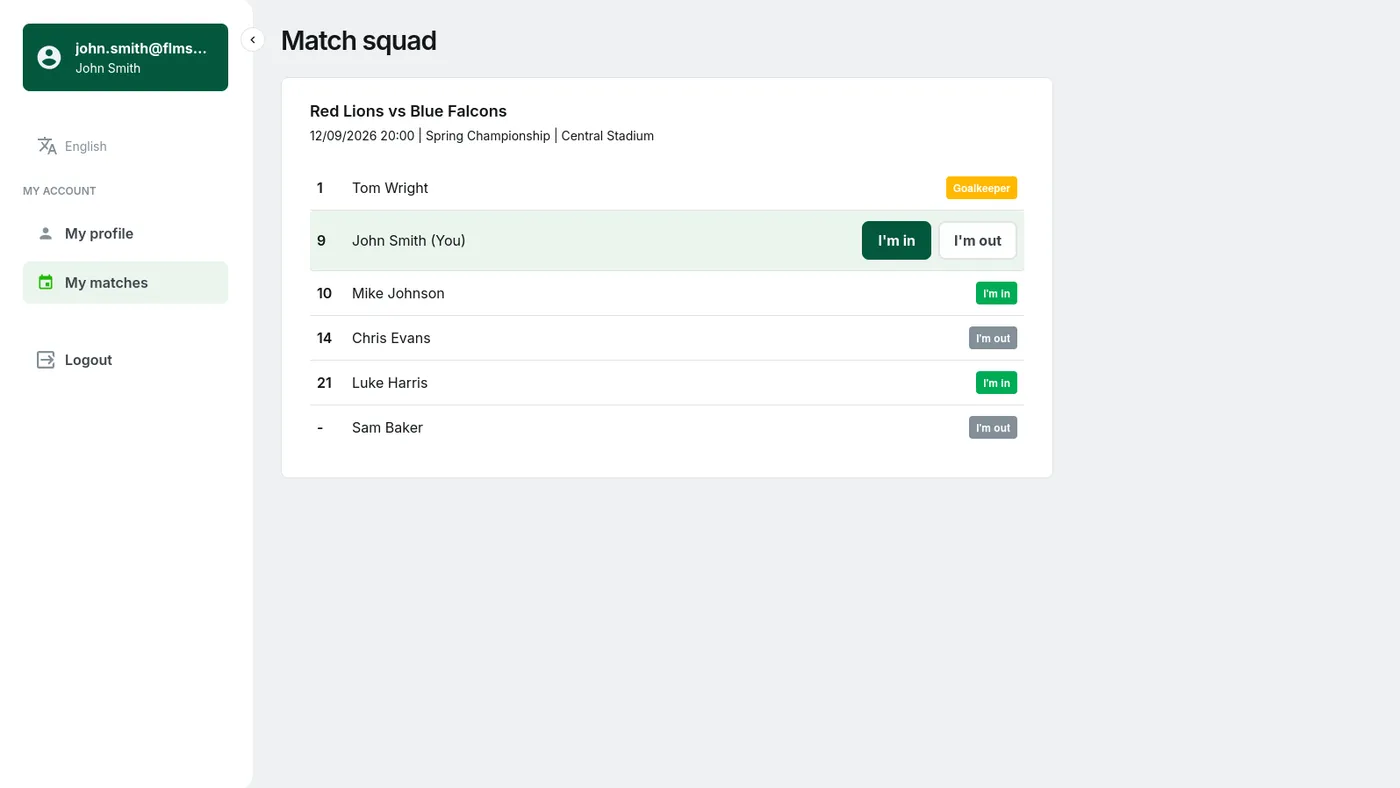
Asking "who is playing on Saturday?" is the most tiring part of running a team. Today the manager collects answers on WhatsApp, chases the stragglers and still clicks everything into the squad by hand. Player accounts turn that around: the player logs in and marks "I'm in" or "I'm out" for their team's next match. The answer goes straight into the squad, so the manager approves nothing and types nothing a second time. Players can also update their own details and shirt number.
The account is light and deliberately very narrow. After logging in a player sees two things: their profile and their matches, with the team squad there to look at, and the only thing they can change is their own answer. The manager keeps full control of the squad and, as before, sets each player's availability, including for players without an account. You send the invitation by email from the player list, and you switch the whole feature on with one toggle in your organisation settings. Leave it off and nothing in your league changes.
For every match the player sees the full details: the date, the kick-off time, the competition and the venue, so nobody has to ask in the group chat where you are playing this week. They can also see how their team-mates have answered, and a list with "I'm in" already next to a few names nudges the rest into replying. The goalkeeper is marked separately on it, so you can see at a glance whether you have anyone in goal for the next match.